

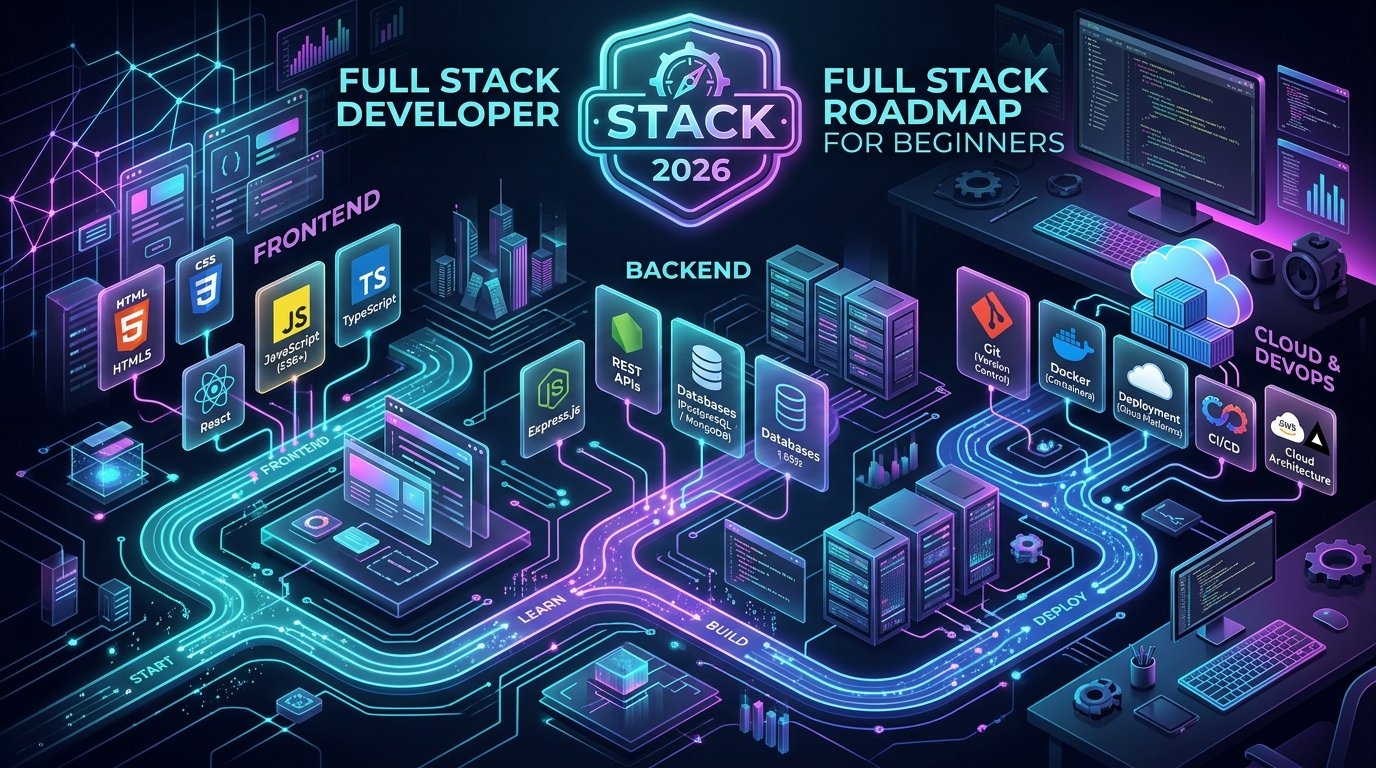
Embarking on the journey to become a full stack developer in 2026 can feel profoundly exhilarating — and equally overwhelming. Every search returns an intimidating sea of acronyms, competing frameworks, endless YouTube tutorials, and contradictory advice urging you to learn five languages at once.
The liberating truth is simple: you do not need to learn everything. Successful developers do not achieve mastery by memorizing every library on npm; they succeed by mastering foundational building blocks in a coherent, deliberate order and applying them to solve real-world problems.
A truly beginner-friendly full stack development roadmap takes you methodically from basic document structure to architecting, deploying, and maintaining complete, scalable web applications. In this comprehensive pillar guide, we break down the entire journey into eleven practical steps — beginning with HTML & CSS, advancing through modern JavaScript, React, and TypeScript, conquering Node.js, Express, REST APIs, and databases (SQL & NoSQL), and culminating in cloud deployment, security authentication, and production portfolio projects.
By the end of this roadmap, you will possess a crystal-clear understanding of what to learn, the exact order to learn it in, the fatal pitfalls to avoid, and the concrete skills required to become genuinely job-ready in 2026.
🎁 Download Free Full Stack Developer Roadmap 2026 — PDF Checklist
Want to track your full stack development journey step-by-step? Download our free 2026 Roadmap PDF and check off each skill as you master it. Includes complete checklists for HTML/CSS, JavaScript, React, TypeScript, Node.js, SQL/NoSQL, 10 portfolio project blueprints, and a structured 6-month study schedule.
What Is a Full Stack Developer?
A full stack developer is a software engineer who possesses the technical capability to build, integrate, and maintain both the client-side (frontend) and server-side (backend) layers of a web application.
To understand the full stack perspective, consider how modern web applications are structured across multiple collaborating tiers:
↓
FRONTEND TIER (UI, State, Animations, User Experience)
↓ HTTPS Requests (JSON / REST / GraphQL)
BACKEND API & APPLICATION LOGIC (Auth, Validation, Processing)
↓ Database Driver / ORM Queries
DATABASE & STORAGE (PostgreSQL, MongoDB, Redis, S3)
↓ Hosted On
CLOUD INFRASTRUCTURE & SERVERS (Vercel, AWS, Docker, Linux)
🎨 The Frontend Layer
The visual and interactive surface that runs inside the user's browser. It is responsible for layout, typography, navigation, responsive design across mobile/desktop, forms, client-side input validation, animations, and consuming backend APIs. Primary technologies: HTML5, CSS3, JavaScript, React, Next.js, and TypeScript.
⚙️ The Backend Layer
The invisible brain powering the system on remote servers. It handles sensitive operations: verifying user passwords, hashing data, authorizing permissions, processing payment transactions, orchestrating business logic, and querying the database. Primary technologies: Node.js, Express.js, Python, Java, or C#/.NET.
🗄️ The Database Layer
Persistent data storage where users, orders, articles, transactions, and inventory live safely across server reboots. Primary systems include relational databases like PostgreSQL and MySQL, and document databases like MongoDB.
Crucially, being a full stack developer does not mean you must possess the specialized, decade-long depth of an infrastructure architect or a veteran database administrator. Rather, it means you understand the entire lifecycle of an HTTP request — from a button click in the browser, through server-side business logic, down to the database record, and back.
Full Stack Developer Roadmap at a Glance
Before diving into the detailed curriculum for each stage, here is the complete macro progression roadmap:
💡 The Cardinal Rule of Learning Full Stack
Never attempt to learn every tier simultaneously. Trying to configure a PostgreSQL database, write a React hook, and debug a Docker container in your first month is a guaranteed recipe for burnout. Master one tier, build a tangible project with it, internalize how it works, and only then proceed to the next layer.
Step 1: Learn HTML (The Skeleton of the Web)
HyperText Markup Language (HTML) is the structural foundation of every page on the Internet. It tells the web browser how content is organized — headings, paragraphs, bulleted lists, clickable links, images, tables, and input forms.
Key topics you must master in HTML5:
- Document Anatomy:
<!DOCTYPE html>,<html>,<head>,<body>, and essential meta tags for mobile viewports and SEO. - Semantic Elements: Replace generic
<div>soup with semantic tags (<header>,<nav>,<main>,<section>,<article>,<aside>,<footer>). Semantic HTML dramatically improves search engine ranking and screen reader accessibility. - Interactive Forms & Validation: Input types (text, email, password, number, date), checkboxes, radio buttons, dropdown selects, textareas, labels, and built-in validation (
required,minlength,pattern). - Media & Embeds: Responsive images with
srcset, picture elements, SVG vector icons, audio, and video tags. - Web Accessibility (a11y): ARIA roles, descriptive
altattributes, keyboard tab order, and color contrast awareness.
Beginner Practice Projects for HTML: Do not spend three weeks passively watching HTML tutorials. Spend 4–5 days building a personal profile page, an event registration form with validation, and a multi-section Wikipedia-style article.
Step 2: Learn CSS (Styling, Layouts & Responsiveness)
Cascading Style Sheets (CSS) turn plain text documents into visually compelling, responsive digital interfaces. Modern web development in 2026 relies on fluid, component-driven layouts rather than rigid pixel dimensions.
Core CSS topics to conquer:
- The Box Model: Content, padding, border, and margin. Understand
box-sizing: border-boxso borders and padding don't break your layouts. - Display & Positioning: Block, inline, inline-block, relative, absolute, fixed, and sticky positioning.
- CSS Flexbox (1-Dimensional Layouts): The indispensable tool for navbars, horizontal item rows, vertical centering, and card alignments (
justify-content,align-items,flex-wrap,gap). - CSS Grid (2-Dimensional Layouts): Building full-page grids, responsive dashboard interfaces, and auto-fitting photo galleries (
grid-template-columns: repeat(auto-fit, minmax(280px, 1fr))). - Responsive Design & Mobile-First Media Queries: Using
@mediabreakpoints so your layout adapts flawlessly from a 375px smartphone screen to a 4K desktop monitor. - CSS Custom Properties (Variables): Centralizing theme tokens for colors, font sizes, and dark/light modes.
- Transitions & Micro-Animations: Subtle button hovers, smooth modal transitions, and accordion animations that make interfaces feel alive.
Project Milestones for CSS: Code a modern SaaS landing page navbar with mobile hamburger menu, a responsive e-commerce product card grid, and an interactive pricing table with toggle switches.
Step 3: Learn JavaScript (The Language of the Web)
JavaScript is the beating heart of modern software engineering. It brings static web pages to life, handles user events, fetches real-time data from servers without page reloads, and powers modern frontend frameworks as well as server runtimes.
Do not rush past JavaScript to jump directly into React. A student who understands pure JavaScript can learn React in two weeks; a student who skips JavaScript fundamentals will struggle with React for months.
Core Foundations
- Variables (
let,const) & Scope (block vs function) - Primitive data types & reference types
- Conditionals (
if/else,switch, ternary operators) - Functions (declarations, expressions, ES6 arrow functions)
- Arrays & Iteration (
map,filter,reduce,forEach,find) - Objects, destructuring, rest/spread operators, template literals
Advanced Web JavaScript
- DOM Selection, element creation, and styling manipulation
- Event Listeners, Event Bubbling, and Event Delegation
- Asynchronous JavaScript & The Event Loop
- Promises,
async / await, and robust error handling - The
Fetch APIfor requesting JSON from public REST endpoints - Browser Storage:
localStorageandsessionStorage
Essential Vanilla JavaScript Projects to Build:
- Interactive Todo Application: Full CRUD operations, filtering (All, Active, Completed), and persisting tasks across browser reloads via
localStorage. - Live Weather App: Fetching live meteorological forecasts from a free API (e.g. OpenWeatherMap) based on user city input, displaying loading spinners, and handling network errors gracefully.
- Financial Expense Tracker: Dynamic transaction logs, income vs expense balance calculations, and chart visualizations.
Step 4: Learn Git and GitHub (Version Control & Collaboration)
Never wait until you begin applying for jobs to learn Git. Version control is not an optional extra; it is the daily operating system of every engineering organization worldwide.
Git allows you to track code changes, revert bugs, experiment with new features in isolated branches without breaking production, and collaborate smoothly across distributed engineering teams.
| Command | Action | When You Use It |
|---|---|---|
git init / git clone |
Initialize new repository or download remote project | Day 1 of any project |
git status |
Inspect modified, staged, and untracked files | Constantly during coding |
git add . |
Stage files for commit | Before creating a snapshot |
git commit -m "msg" |
Record snapshot with descriptive message | After finishing a logical feature chunk |
git branch <name> |
Create an isolated feature branch | Before writing experimental code |
git merge |
Combine feature branch back into main | When feature is tested and complete |
git push origin main |
Upload local commits to remote GitHub repository | At the end of every working session |
Professional Portfolio Tip: Treat your GitHub profile as your living technical resume. For every project, write a clean README.md that includes a live demo link, screenshots, a brief problem statement, the complete tech stack, and step-by-step local setup instructions.
Step 5: Learn Frontend Development (React & TypeScript)
Once you are comfortable with HTML, CSS, and pure JavaScript, you are ready to master modern frontend engineering with React, the world's most popular UI library.
According to Stack Overflow's 2025 Developer Survey, the JavaScript and React ecosystem remains the most pervasive frontend framework in enterprise software, with Node.js and full-stack developers reporting React and Next.js as their primary frontend tools.
Learn React Fundamentals
React revolutionizes web development by breaking complex user interfaces into small, reusable, isolated building blocks called components. Master these foundational pillars:
- JSX: Writing HTML-like syntax directly within JavaScript functions.
- Components & Props: Passing data unidirectionally from parent components to child components.
- State (
useState): Managing dynamic variables that re-render the UI whenever their values change (e.g. toggle dropdowns, form input values). - Side Effects (
useEffect): Fetching API data on component mount, setting up event listeners, and cleaning up timers. - Conditional Rendering & Lists: Rendering elements conditionally with ternaries and iterating over arrays with
.map()using uniquekeyattributes. - Custom Hooks & Context API: Sharing global application state (like dark/light theme or logged-in user session) across the component tree without prop drilling.
- React Router: Multi-page single-page application (SPA) routing with dynamic URL parameters.
Learn TypeScript (The Modern Standard in 2026)
In modern web engineering, writing plain JavaScript without static types is increasingly treated as technical debt. TypeScript adds a compile-time static type system on top of JavaScript, catching typos, undefined properties, and API contract bugs before your code ever runs in production.
📈 Authoritative Industry Evidence: GitHub Octoverse 2025
GitHub's 2025 Octoverse Report officially revealed that TypeScript became the #1 most-used programming language across all of GitHub by contributor volume in August 2025, surpassing Python and JavaScript. Learning TypeScript after mastering JavaScript makes your resume instantly stand out to hiring managers.
Step 6: Learn Backend Development (Node.js, Express & REST APIs)
With frontend mastery established, you now step across the full stack divide into server-side engineering. The backend is where applications become powerful, secure, and commercially viable.
What Is Node.js?
Node.js is an open-source, cross-platform JavaScript runtime built on Google Chrome's V8 JavaScript engine. It executes JavaScript outside the browser — directly on a server or computer operating system. Because you already know JavaScript from your frontend training, you do not need to learn a completely new programming language to write server-side code.
Learn Express.js (The Minimalist Server Framework)
While Node.js provides the raw runtime, Express.js provides the streamlined routing, middleware architecture, and HTTP utilities needed to build production web servers. Key concepts include:
- HTTP Routing: Defining endpoints (e.g.
app.get('/api/users'),app.post('/api/products')). - Middleware Pipeline: Functions that inspect, modify, or reject requests before they reach the controller (e.g. parsing JSON request bodies with
express.json(), logging with Morgan, handling CORS). - Model-View-Controller (MVC) Separation: Separating route declarations, business logic (controllers), and database schemas into modular folders.
- Centralized Error Handling: Intercepting 404 and 500 errors uniformly and returning formatted JSON error payloads.
Learn REST APIs (Representational State Transfer)
A REST API is the standardized contract through which your React frontend communicates with your Node.js backend. Every full stack developer must master the standard HTTP methods and status codes:
GET(Retrieve data, e.g. status200 OK)POST(Create new data, e.g. status201 Created)PUT / PATCH(Update existing records, e.g. status200 OK)DELETE(Remove records, e.g. status204 No Content)- Client errors (
400 Bad Request,401 Unauthorized,403 Forbidden,404 Not Found) and server errors (500 Internal Server Error).
Learn Authentication & Authorization
Security is the hallmark of a mature developer. Understand the vital difference:
- Authentication: "Who are you?" Verifying identity using email, password, and multi-factor tokens.
- Authorization: "What are you allowed to do?" Determining if a logged-in user has permission to view an admin dashboard, edit a post, or refund an order.
Master industry standards: hashing passwords with bcrypt (never store plain text passwords!), issuing JSON Web Tokens (JWT), transmitting tokens securely via HTTP-only cookies, and writing authentication middleware to protect private API endpoints.
Step 7: Learn Databases (SQL vs NoSQL)
Every meaningful web application requires persistent storage. Knowing which database to select and how to query it efficiently is one of the most heavily tested skills in technical interviews.
🐘 Relational Databases (SQL)
Top Choice: PostgreSQL
- Structured tables with rigid schemas (rows and columns)
- Data integrity guaranteed via Primary Keys and Foreign Keys
- Relationships: One-to-One, One-to-Many, Many-to-Many
- Advanced querying:
INNER JOIN,LEFT JOIN, aggregations, subqueries - ACID compliance for critical financial transactions
- ORM / Query Builders: Prisma, Drizzle, or TypeORM
🍃 Document Databases (NoSQL)
Top Choice: MongoDB
- Stores data as JSON-like flexible documents inside collections
- Dynamic schemas ideal for rapid early-stage prototyping
- Embedding related sub-documents vs referencing ObjectIDs
- Aggregation pipelines for statistical grouping
- Seamless integration with Node.js via Mongoose ODM
Recommendation for 2026 Beginners: Start by learning PostgreSQL. Having rock-solid SQL fundamentals prepares you for 90% of enterprise database interviews, while learning MongoDB later takes only a few days.
Step 8: Learn Deployment and Cloud Basics
A web application that only runs on localhost:3000 does not help you get hired. You must know how to build production bundles, set environment variables, and deploy your code to live cloud hosting platforms.
Key deployment essentials:
- Frontend Hosting: Deploying React / Next.js applications on Vercel or Netlify with automated continuous deployment on every Git push.
- Backend API Hosting: Deploying Node.js servers on platforms like Render, Railway, or AWS EC2.
- Managed Cloud Databases: Hosting PostgreSQL on Supabase or Neon, and MongoDB on MongoDB Atlas.
- Domains, DNS & SSL: Pointing custom domain A-records and CNAMEs, and enabling free automatic HTTPS certificates via Let's Encrypt / Cloudflare.
- Environment Security: Storing database connection strings, JWT secret keys, and API tokens securely in
.envfiles, and adding.envto.gitignoreso credentials are never leaked publicly on GitHub.
Step 9: Learn Testing and Debugging
A junior developer writes code and hopes it works; a professional developer writes automated tests to prove it works and knows how to systematically debug failures when they occur.
- Unit Testing: Testing isolated utility functions and components using Jest and React Testing Library.
- API Integration Testing: Simulating HTTP requests against backend endpoints using Supertest and Postman collections.
- Methodical Debugging: Reading runtime stack traces calmly, using browser DevTools (Network tab, React Profiler, Breakpoints) instead of littering code with random
console.log()statements.
Step 10: Build Full Stack Projects (Your Portfolio Foundation)
Building 25 trivial tutorial clones (like counter apps or simple calculators) will not convince an engineering manager to hire you. Employers want to see 3 to 4 comprehensive, production-grade applications that demonstrate end-to-end problem-solving ability.
Project 1 — Secure Role-Based SaaS Authentication System
A complete authentication boilerplate featuring email/password sign-up, JWT in HTTP-only cookies, password reset flows with transactional emails (Resend/SendGrid), role-based access control (Admin, Editor, Member), and user profile management.
Tech Stack: React, TypeScript, Node.js, Express, PostgreSQL, Prisma, Tailwind CSS.Project 2 — Full-Featured E-Commerce Marketplace
Product catalogs with full-text search, multi-faceted filtering (category, price range, ratings), dynamic cart state, live payment gateway integration (Stripe / Razorpay test mode), order tracking, and an admin inventory management dashboard.
Tech Stack: Next.js (App Router), PostgreSQL, Stripe API, Cloudinary (image uploads), Docker.Project 3 — Real-Time Collaborative Workspace / Job Portal
A developer job board where employers post vacancies and candidates apply with uploaded PDF resumes, featuring real-time messaging or live notifications powered by WebSockets (Socket.io).
Tech Stack: React, Node.js, MongoDB, Socket.io, AWS S3 for resume storage.Project 4 — AI-Powered Full Stack SaaS Application
An intelligent document summarizer, automated code reviewer, or mock technical interview simulator that streams AI responses from the OpenAI or Anthropic API, stores user chat history in a database, and meters usage limits per tier.
Tech Stack: Next.js, TypeScript, PostgreSQL, OpenAI SDK, Vercel AI SDK, Tailwind CSS.Step 11: Learn Basic DevOps & Containerization
In modern engineering, the boundary between full stack developers and operations continues to blur. Familiarizing yourself with foundational DevOps concepts elevates you from an entry-level coder to an independent software builder:
- Docker Basics: Writing a
Dockerfileto package your Node.js application and its dependencies into a reproducible container that runs identically on Mac, Windows, and Linux servers. - Docker Compose: Spinning up a multi-container local development environment containing your frontend, Node.js server, and PostgreSQL database with a single
docker compose upcommand. - CI/CD with GitHub Actions: Automatically executing test suites and lint checks whenever a pull request is opened.
Full Stack Developer Roadmap: Realistic 6-Month Plan
Here is a structured, field-tested 6-month timeline designed for disciplined learners studying 15 to 20 hours per week:
| Month | Primary Focus | Milestone Deliverable |
|---|---|---|
| Month 1 | HTML5, Modern CSS3, Flexbox, Grid, Responsive Design | Responsive SaaS landing page & accessible forms |
| Month 2 | JavaScript Fundamentals, DOM, ES6+, Async/Await, Fetch API | Interactive Weather Dashboard & CRUD Todo Application |
| Month 3 | React, Components, State, Hooks, React Router, Git/GitHub | Multi-page Movie Explorer consuming third-party REST API |
| Month 4 | Node.js, Express.js, REST API Architecture, Middleware | Complete backend API with CRUD endpoints & Postman test suite |
| Month 5 | PostgreSQL / MongoDB, Database Relationships, JWT Authentication | Secure Full-Stack E-Commerce or Role-Based SaaS Application |
| Month 6 | TypeScript, Cloud Deployment, Docker Basics, Portfolio & Mock Interviews | Live portfolio website with 3 deployed production apps on GitHub |
MERN vs Other Full Stack Stacks
While the MERN Stack (MongoDB, Express, React, Node) remains the most publicized acronym on coding bootcamps, it is just one of several proven full-stack combinations in modern industry:
| Technology Stack | Frontend | Backend | Database | Best Suited For |
|---|---|---|---|---|
| MERN Stack | React | Node.js + Express | MongoDB | Rapid MVPs, startups, flexible document schemas |
| PERN Stack | React | Node.js + Express | PostgreSQL | Production applications requiring strict relational data integrity |
| Next.js Full Stack | Next.js (React) | Server Actions / Route Handlers | PostgreSQL (Prisma) | Modern SaaS, high-performance SEO apps, server-rendered UIs |
| Java Full Stack | React / Angular | Java + Spring Boot | MySQL / Oracle | Global banking, insurance, Fortune 500 enterprise backends |
| .NET Full Stack | React / Angular | C# + ASP.NET Core | SQL Server | Enterprise corporations, healthcare, corporate business software |
| Python Full Stack | React | Django / FastAPI | PostgreSQL | AI-driven platforms, data science backends, rapid APIs |
Common Mistakes Beginners Make While Learning Full Stack
Trying to learn React, Angular, Vue, Django, Spring Boot, and ASP.NET in the same year guarantees shallow understanding of everything and mastery of nothing. Pick one stack (like React + Node.js + PostgreSQL) and stick with it until you can build an application from scratch without tutorials.
Watching 80 hours of YouTube coding walkthroughs creates the dangerous illusion of competence. True learning only happens when you close the video, stare at a blank code editor, break something, read the compiler error, and fix it independently.
AI coding assistants like ChatGPT and Copilot are fantastic productivity multipliers for experienced developers, but they can cripple beginners who copy code without understanding the underlying mechanics. The rule is simple: if you cannot explain every line of code on your screen, you haven't learned it yet.
Many beginners think databases are just dumping grounds for JSON objects. In technical interviews, senior engineers will rigorously test your understanding of primary keys, foreign keys, one-to-many relationships, SQL joins, and database indexing.
How to Prepare for Full Stack Developer Interviews
Technical interviews in India (Gurugram, Bengaluru, Hyderabad, Pune, Noida) and global remote roles generally follow a structured four-stage evaluation:
- Round 1 — JavaScript & Core Fundamentals: Closures, hoisting, prototypal inheritance, Event Loop microtasks vs macrotasks, Promises,
async/await, array manipulation algorithms. - Round 2 — React & Frontend Machine Coding: Building an interactive component under a 60-minute timer (e.g. debounced search autocomplete, infinite scroll list, or modal system) while demonstrating clean state management and component separation.
- Round 3 — Backend, APIs & Databases: Designing RESTful endpoints, demonstrating JWT authentication middleware, writing complex SQL queries with joins, and handling concurrent requests.
- Round 4 — System Design & Project Deep-Dive: Walking through your portfolio projects on GitHub, defending your architectural decisions, explaining database schema normalization, and answering: "How would you scale this app to handle 100,000 daily active users?"
Is Full Stack Development a Good Career in 2026?
The short answer is an emphatic yes. As companies face pressure to build leaner, more agile software engineering teams, engineers who understand the entire system architecture are prized over narrow specialists who can only work on one button or one isolated SQL table.
According to Stack Overflow's 2025 Developer Survey (49,019 respondents across 177 countries, including 2,536 respondents / 7.2% from India):
- 76% of respondents identified as professional developers.
- 69% reported spending dedicated time learning a new programming language or framework during the past year, showing that software development is a continuous growth career.
- GitHub's 2025 Octoverse Report confirmed that the global software development community has surpassed 180 million developers across more than 630 million open-source projects, reflecting sustained global expansion.
In 2026, the demand is especially strong for full-stack developers who combine core web engineering with modern AI tool integration (consuming LLM APIs, building retrieval-augmented generation pipelines, and deploying automated workflows).
Final Full Stack Developer Roadmap (Summary Visual)
The single greatest takeaway is this: you do not need to know everything to start building; you need to start building to learn what you need next. Take the first step today, write clean code daily, and embrace the process.
Download Free Full Stack Developer Roadmap 2026 — PDF Checklist
Keep this printable 11-page full-stack checklist, project templates, and study planner with you as you code your way to job readiness.
Recommended Industry-Aligned Training Tracks
Aptech Learning Gurugram provides structured classroom and hybrid programs with live coding mentorship, real-world portfolio sprints, and dedicated placement support:
Java vs Python: Which to Learn First in 2026? →
Compare learning curves, AI vs enterprise career paths, salaries, and framework ecosystems.
Smart Pro Python Web Development Track →
Master Core Python, Django, REST APIs, PostgreSQL, and full-stack cloud deployment.
Smart Pro Java Web Development Track →
Master Core Java, Spring Boot, Microservices, Hibernate, and enterprise API architecture.
SQL vs Python vs R Decision Guide →
Understand database querying vs programming for modern data and web engineering careers.
Frequently Asked Questions (FAQs)
Q1. What is the best full stack developer roadmap for beginners?
The proven beginner path starts with HTML5, CSS3, and JavaScript fundamentals, moves to version control with Git and GitHub, adds React and TypeScript for frontend engineering, transitions to backend APIs with Node.js and Express, masters relational databases with PostgreSQL/SQL, integrates JWT authentication, and deploys full-stack portfolio applications to the cloud.
Q2. How long does it take to become a full stack developer?
For a dedicated beginner studying 15 to 20 hours per week, covering the core stack typically takes between 6 to 9 months. The exact timeline depends on your consistency, prior programming exposure, depth of hands-on project building, and interview preparation.
Q3. Can I become a full stack developer without a computer science degree?
Yes, absolutely. While some traditional enterprise recruiters still prefer formal degrees, the tech industry increasingly evaluates developers based on their GitHub portfolio, live deployed projects, technical problem-solving, and practical ability to write clean, maintainable code.
Q4. Is MERN still worth learning in 2026?
Yes. The MERN stack (MongoDB, Express, React, Node) remains widely used and beginner-friendly because it allows you to write JavaScript across both client and server. However, in 2026, competitive candidates should supplement MERN with TypeScript, SQL (PostgreSQL), and cloud deployment rather than relying on MongoDB alone.
Q5. Should I learn frontend or backend first?
Beginners should almost always start with frontend fundamentals (HTML, CSS, and JavaScript) because you get immediate visual feedback for every line of code you write. Once you understand DOM manipulation and asynchronous API calls, learning backend server logic becomes far more intuitive.
Q6. Is JavaScript enough for full stack development?
JavaScript can be used on both the frontend (React/Next.js) and backend (Node.js/Express), which streamlines learning. However, knowing JavaScript syntax alone is not enough — you must also master databases (SQL/NoSQL), REST API design, authentication security, Git, and deployment.
Q7. Should I learn TypeScript as a beginner?
Master vanilla JavaScript fundamentals first so you understand how the language executes dynamically. Once comfortable with JavaScript and React, adding TypeScript is strongly recommended — GitHub reported TypeScript as the #1 most-used language by contributors in August 2025.
📞 Ready to Fast-Track Your Full Stack Career?
Connect with EduQuest's senior full stack mentors at +91 99580 41888 or visit our classroom campus at Galleria Market, DLF Phase-IV, Sector 28, Gurugram. We offer hands-on project coaching, resume critiques, and interview preparation tailored to your background.
